Play the original Project I.G.I.: I'm Going In in a compatible browser. Select your own legally obtained game folder when the player asks for it; this site does not host or distribute the original commercial game files.
This website is free to access: there is no sign-up and no installer. To play, select your own legally obtained copy of Project I.G.I. The browser copies the selected files into private browser storage on your device; this site does not host or distribute the original commercial game data, and the files are not uploaded to our servers.
Project I.G.I.: I'm Going In is a first-person tactical stealth shooter originally released in 2000. You play as David Jones, a former SAS soldier working through high-risk missions that reward observation, planning and controlled action.
Use the environment, long-range weapons, equipment and careful movement to infiltrate enemy positions. Its large outdoor areas and mission-based structure helped make it a memorable PC shooter.
This is an unofficial fan page and does not include or distribute the original copyrighted game data.
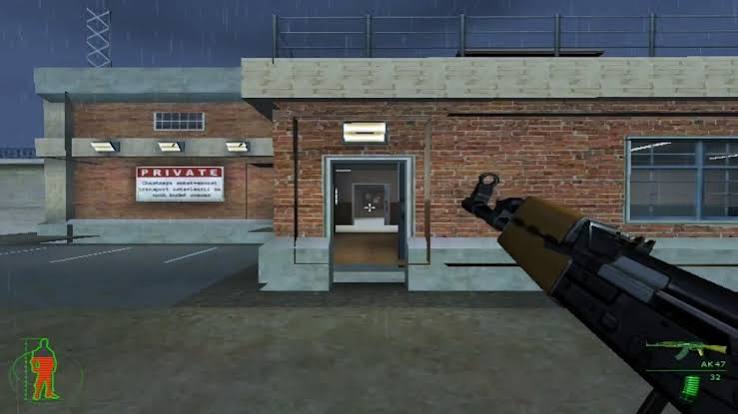
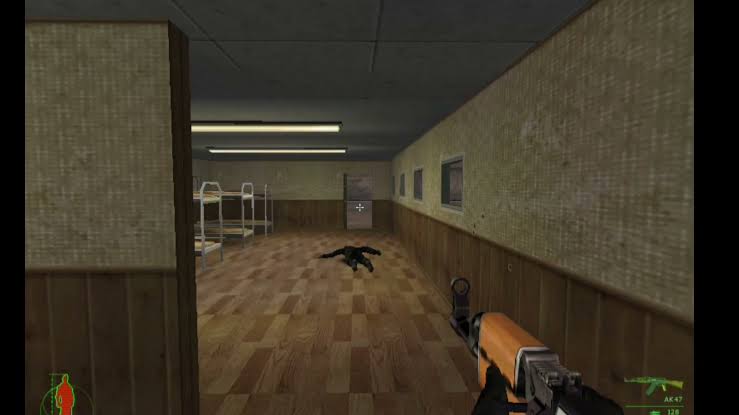
These screenshots are included in this repository as gameplay references. They show scenes from the game, not promotional artwork for an official release.
✥Move — the stick on the left. Push forward and slide your thumb up onto the runner to lock running; tap the stick to stop. WALK: tap to walk, tap again to run.
⌖Aim — swipe anywhere in the middle. Hold either FIRE and drag to aim while shooting.
◎Scope — tap the eye to snap the sniper scope or binoculars to 4× and back; + / − fine-tune.
⇅Crouch / jump / peek — around FIRE. Tap CROUCH to crouch, tap again to stand. There is no prone in this game.
⚙Settings — sensitivity, scope zoom, gyroscope, and Edit layout to drag the buttons where you like. MENU pauses; tap the menu items as usual.
⟲Gyroscope — turn the phone to fine-aim while scoped, like PUBG. Your browser may ask for motion access.
Press Alt + Enter for fullscreen
Click the game to capture the mouse (full 360° turning)
Project I.G.I.
Pick your Project I.G.I. folder: the one that holds igi.exe, MISSIONS and COMMON. It is copied
into this browser's private storage once (about 600 MB) and never leaves your computer.
Online 1v1. Each player needs a controller or the keyboard.
Host a game
Get a room code to send to your friend.
Server location
For friends in another country, a server between you is fairest.
or
Join a game
Enter the code your friend sent you.
Room code
Input delay
Auto picks the lowest delay your connection allows. Higher is smoother on a bad link; 2 or 3 frames need a direct connection in the same city or country.
Waiting for the host to start.
Project I.G.I.
Starting the game…
INTEL
✦ Free site access · bring your own game files
▣ WebAssembly-powered
⌨ Keyboard + mouse
◫ Touch UI available
03 / HOW TO PLAY
Get into the mission
01
Start the game
Wait for browser checks and runtime preparation, then choose Play.
02
Move with the keyboard
Use movement keys shown in the live controls panel. Click a key there to rebind it.
03
Aim and interact
Use the mouse to look around and configured mouse buttons to aim and fire.
04
Use fullscreen
Expand the game window for an immersive view. Press Alt + Enter where supported.
05
Adjust your setup
Use Controls & Settings to tune sensitivity, rebind keys and adjust supported options.
06
Keep your files safe
Do not clear browser site data if you want to retain locally stored game data and saves.
Action
Key / input
Movement
Modern preset: WASD; other bindings are shown in Controls & Settings.
Aim / look
Mouse
Fire
LMB
Alternate fire / scope toggle
Middle mouse / RMB
Reload / use
Enter / Right Shift
Crouch / jump / peek
Right Ctrl / Numpad 0 / Numpad 1
Binoculars / walk-run
Space / W (held)
Map computer / menu
C / Esc
Menu
Esc
Fullscreen
Alt + Enter
The mouse defaults are left-click to fire, middle-click for alternate fire and right-click to toggle the scope. Keyboard actions listed here match the browser control layer; rebindable keys can be changed in Controls & Settings.
04 / FEATURES
Built for tactical play
⌖
Stealth gameplay
Plan routes, observe patrols and choose when to engage.
⚒
Weapons & equipment
Use a range of weapons and mission equipment as the situation demands.
▤
Mission campaign
Work through objectives across varied environments.
▣
Browser runtime
The port uses WebAssembly to run within a compatible browser.
↻
Local data support
Browser storage is used for runtime data; keep site data intact.
☷
Touch interface
Touch controls and layout options are available on supported devices.
05 / TIPS & TRICKS
Practical Project I.G.I. mission tips
Use binoculars to scout guards and the route ahead before crossing an exposed area.
Watch for security cameras and use available computer terminals to interfere with surveillance systems.
Choose cover and a quiet approach where possible; open firefights make stealth harder.
Plan each objective before engaging. The original campaign contains 14 missions and does not allow saving midway through a mission.
Health recovery depends on finding a medical kit; do not assume that taking cover alone restores health.
Keep a backup of your own game folder and avoid clearing the browser storage that holds the imported copy.
HELP & SUPPORT
Questions before you play?
The full FAQ covers file import, browser storage, compatibility, touch and gyro controls, multiplayer availability and common startup problems.

 IGI OnlineIGI Project · IGI Web Edition▶ Play Now