
What IGI Online is
IGI Online is the name of this independent fan-made browser project. It provides a web page, a launcher and a browser port for the original Project I.G.I.: I'm Going In. The project is not the original 2000 game publisher, does not represent the developers or rights holders, and is not an official release. The game title and related intellectual property remain with their respective owners.
The purpose of the site is practical: give people who already have a lawful copy another way to try the game in a compatible browser, with help pages for setup, controls, storage and common problems. The web page itself is free to access and does not ask visitors to sign up or install a separate launcher. That does not mean the commercial game is included. Every player must provide their own legally obtained game files.
The original Project I.G.I. game
Project I.G.I.: I'm Going In was developed by Innerloop Studios and published by Eidos Interactive. It was released for Windows in 2000. Contemporary coverage describes it as a single-player first-person shooter built around infiltration, reconnaissance, surveillance and firefights. Its player character is David Llewelyn Jones, a former Special Air Service member working as an operative. The campaign is commonly listed as 14 missions.
The appeal of the original game is its mix of observation and risk. A mission is not simply a sequence of targets to shoot. Players can scout a location, study guard positions, use binoculars, watch for surveillance cameras, use computer terminals to interfere with security systems and decide when to move quietly or fight. The environments include outdoor military areas and enclosed facilities, so the best route can depend on the mission and the equipment available.
The original campaign is single-player. This distinction matters because the current website also contains a separate online 1v1 room feature. That multiplayer option is part of this browser project; it is not a mode from the original 2000 release. The room option requires the multiplayer service to be reachable, so the presence of the controls in the page should not be read as a guarantee that every session or network will connect.
How the browser port works
The port uses WebAssembly for the game runtime and WebGPU for graphics in compatible browsers. The page keeps the browser player, controls and explanatory content together, while the original game folder is supplied by the visitor. When the launcher asks for a folder, select the directory from your own copy that contains the game executable and its related data. The first import can take time because the folder contains many files.
The browser copies the selected game data into storage associated with this website's origin. The implementation uses the Origin Private File System where the browser supports it. That storage belongs to the current browser profile and site origin; it is not a public download area. The import flow is designed to read the folder selected by the visitor and keep the working copy in local browser storage, rather than upload the commercial game folder to the website.
Because the files are held by the browser, storage behavior matters. Clearing this site's data, using a private browsing window, switching browser profiles or moving to another browser can remove access to the imported copy. Keep a separate backup of your original game folder. The site cannot restore game files that the browser has deleted from local storage, and it does not provide replacement game archives.
Controls and display options in this build
The desktop control layer supports keyboard bindings, mouse-button actions and mouse sensitivity settings. A Modern movement preset uses W, A, S and D; the live Controls & Settings panel shows the active bindings and lets a player rebind supported keys. The current default action map assigns left mouse to Fire, middle mouse to Alternate fire and right mouse to the scope toggle. Other mapped actions include Enter for Reload, Right Shift for Use / activate, Right Ctrl for Crouch, Numpad 0 for Jump, Numpad 1 for Peek, Space for Binoculars, W held for Walk / run, C for the map computer and Esc for the menu.
On supported touch devices, the page provides an on-screen movement stick and action buttons. The layout editor can reposition controls and adjust their size and opacity. Touch aiming uses swipes; gyroscope aiming is available when the browser exposes device-motion input and any required permission is granted. If motion input is unavailable or declined, use touch swipe aiming instead. The browser also has a widescreen option for the 3D view. Some menus and scoped views keep 4:3 proportions, so the whole interface should not be described as a fully widescreen redesign.
These are features visible in the current source code, not a promise that every device supports them equally. WebGPU, available memory, browser storage, fullscreen and motion permissions vary by browser, operating system and hardware. A browser can load a page successfully while still lacking the graphics or storage capability needed to run a large game.
Practical mission advice
Use binoculars to study a guard post before approaching it. Watch for patrols and cameras rather than sprinting into an open area. Where a mission gives you access to a computer terminal, consider whether it can help with surveillance before you trigger a confrontation. Take cover when a firefight begins, manage ammunition and remember that the original game can punish mistakes quickly. Medical kits are the recovery option described in the original game's contemporary review; do not assume health returns automatically while you wait.
The original campaign does not provide mid-mission saves, so plan a mission attempt as a continuous run. Read the objective, scout the area and choose a route before committing to an exposed position. These suggestions describe mechanics reported for the original game; the exact route and best decision still depend on the mission, equipment and difficulty you choose.
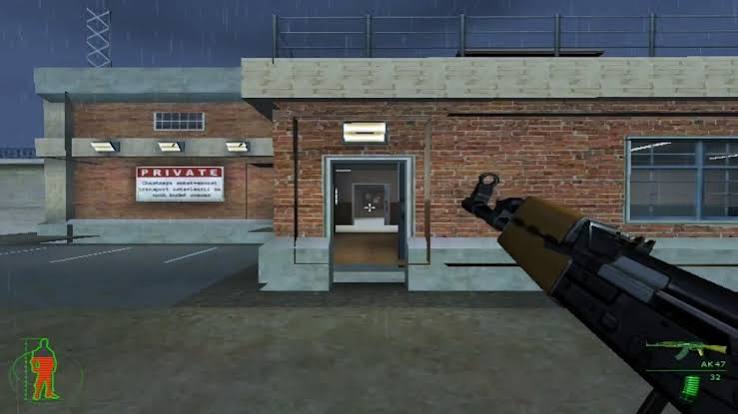
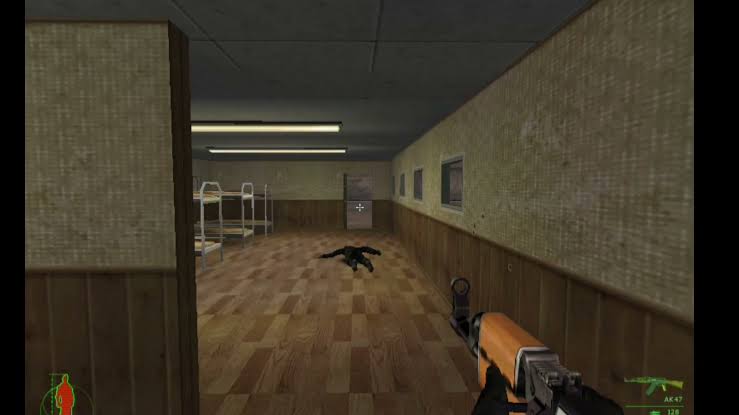
Gameplay screenshots
The images below are gameplay screenshots stored with this project. They are included to show examples of the game's environments and first-person view, not to imply an official relationship or a downloadable game package.
Independent project and useful links
IGI Online is an independent fan-made browser project. It is not affiliated with, endorsed by, sponsored by or connected to Innerloop Studios, Eidos Interactive or any other rights holder. No original commercial game files are hosted or distributed by this website. Use only files you are legally entitled to use.
For external game-history references, see the GameSpot review from 2000, the IGDB press kit and the PCGamingWiki game record. For this site, start with the browser player, check the controls guide, read the full FAQ and review the fan-project disclaimer. Rights holders can find the DMCA and takedown information.